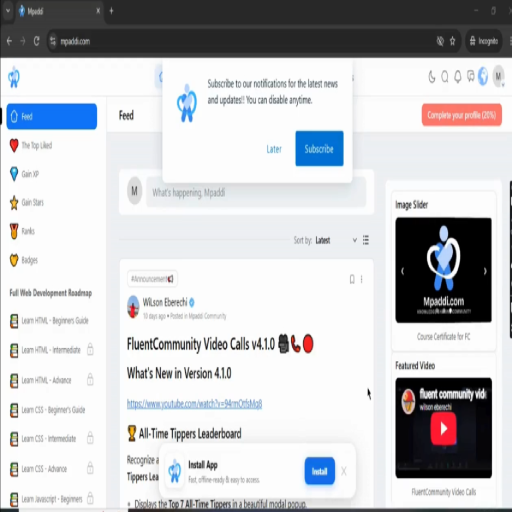
Community Sidebar for FluentCommunity
Community Sidebar transforms the FluentCommunity sidebar into a dynamic, interactive community hub with member discovery, space recommendations, online member activity, trending topics, daily inspiration, promotional banners, and featured video content—all managed from one clean WordPress admin area. Community Owners can earn money by promoting people, paid banners on image slider, featured videos, paid spaces.

Community Sidebar for FluentCommunity
Short Description
Community Sidebar transforms the FluentCommunity sidebar into a dynamic, interactive community hub with member discovery, space recommendations, online member activity, trending topics, daily inspiration, promotional banners, and featured video content—all managed from one clean WordPress admin area.
Community Owners can earn money by promoting important people, paid banners on image slider, featured videos, paid or private spaces.
VIDEO:
About the Plugin
Community Sidebar is a powerful enhancement for FluentCommunity that adds a collection of useful, engaging, and highly customizable sidebar widgets to your community portal.
Instead of leaving your FluentCommunity sidebar underused, the plugin turns it into a place where members can discover people, find new spaces, see who’s online, explore topics, interact with motivational content, and view promotional or featured media.
The plugin includes six major sidebar modules:
- 👥 Who to Follow
- 🏠 Suggested Spaces
- 🟢 Currently Online
- #️⃣ Topics
- ✨ Quote of the Day
- 🖼️ Activity Widgets — Image Slider & Featured Video
Each module has its own settings and can be enabled, disabled, and customized independently.
Interactions such as following members, joining spaces, browsing content, loading members, and navigating widgets are designed to work dynamically without requiring full-page reloads.
Key Features
👥 1. Who to Follow
Help members discover interesting people inside your community.
Features:
- Display recommended community members
- Customizable widget title
- Choose how many members to display
- Member avatars and profile information
- Username and display name
- Short member descriptions
- Verified member indicators
- Member activity information
- Community points information
- Follow / Unfollow directly from the widget
- AJAX-powered interactions
- Featured/pinned members
- Admin-controlled featured member ordering
- Automatically fill remaining positions with other members
- Excludes the current logged-in user
- Member search for administrators
This makes it easier for members to discover people they may want to connect with.
🏠 2. Suggested Spaces
Help members discover communities and spaces they haven’t joined yet.
Features:
- Recommend FluentCommunity Spaces
- Customizable widget title
- Configurable number of suggestions
- Space logo and cover image
- Space description
- Member count
- Join / Leave functionality
- AJAX-powered joining and leaving
- Featured/pinned spaces
- Admin-defined featured-space ordering
- Excluded spaces
- Random recommendations to fill available slots
- “See All” modal
- Paginated space directory
- Search spaces
- Privacy-aware recommendations
- Automatic fallback when there are no new spaces to suggest
Admins can decide which spaces deserve priority while still allowing the widget to dynamically discover other spaces.
🟢 3. Currently Online
Show members who are currently active in your community.
Features:
- Live online member list
- Member avatars
- Online member count
- Customizable widget title
- Configurable refresh interval
- Automatic background refresh
- “See All” member interface
- AJAX-powered member loading
- Member profile information
- No page refresh required
The widget can continuously refresh in the background so members can see who’s around and available to interact with.
#️⃣ 4. Topics
Give members an easy way to discover conversations and subjects being discussed inside the community.
Features:
- Display community topics
- Topic pills/tags
- Topic post counts
- Topic-based browsing
- Space-aware topic discovery
- Click a topic to explore related posts
- Topic posts displayed inside a modal
- AJAX-powered browsing
- No page reload
- Clean, compact sidebar presentation
Topics turn the sidebar into a lightweight discovery tool for finding conversations that matter to members.
✨ 5. Quote of the Day
Add a little inspiration to your community every day.
Features:
- Daily motivational quote
- Automatically changes by day
- Previous / Next quote navigation
- Shuffle for a new quote
- Save quotes to favorites
- Favorite quote functionality
- Share quotes
- Copy quote functionality
- Customizable widget title
- Configurable action buttons
- Built-in offline quote collection
- Automatic fallback when external quote retrieval isn’t available
- Prevents the widget from appearing empty
- AJAX-powered interactions
The included quote library provides a reliable fallback so the widget can continue functioning even when an external source isn’t available.
🖼️ 6. Activity Widgets
Turn your sidebar into a promotional and media showcase.
Activity Widgets combines:
Image Slider
Create attractive visual promotions, announcements, campaigns, featured content, or community highlights.
Features:
- Enable / disable slider
- Multiple slides
- WordPress Media Library integration
- Slide title
- Slide description
- Custom link
- Open links in a new tab
- Enable / disable individual slides
- Slider layout
- Carousel layout
- Grid layout
- Masonry layout
- Configurable number of grid columns
- Lightbox support
- Slider design options
- Multiple transition styles
- Autoplay
- Configurable autoplay speed
- Adjustable image height
Featured Video
Display an important video directly in the sidebar.
Supported sources include:
- YouTube
- Vimeo
- Bunny Stream
- Direct WordPress Media Library video uploads
Features:
- Custom video title
- Video description
- External video URL
- Uploaded video files
- Automatic embed URL handling
- YouTube URL conversion
- Vimeo URL conversion
- Bunny Stream URL conversion
- Browser-supported uploaded videos
This makes the sidebar useful for announcements, tutorials, community introductions, promotional campaigns, featured creators, courses, events, and more.
🎨 Complete Customization
Community Sidebar is designed so administrators can control the experience without editing code.
Depending on the widget, you can customize:
- Widget titles
- Number of displayed members
- Number of suggested spaces
- Online refresh interval
- Member count badges
- Space descriptions
- Featured members
- Featured spaces
- Excluded spaces
- Quote controls
- Slider layouts
- Slider designs
- Slider transitions
- Autoplay
- Autoplay speed
- Image height
- Grid columns
- Lightbox
- Featured video
- Widget placement
- Widget display order
⚡ AJAX-Powered Experience
The plugin is built around a dynamic experience.
Members can perform actions such as:
- Follow members
- Unfollow members
- Join spaces
- Leave spaces
- Browse members
- Browse spaces
- Search spaces
- Explore topics
- Browse topic posts
- Navigate quotes
- Favorite quotes
- Share quotes
- Copy quotes
- Navigate media
without requiring unnecessary full-page reloads.
📌 Featured Content Controls
Community owners can deliberately promote important people and spaces.
For example, you can pin:
- Community moderators
- Administrators
- Top contributors
- Coaches
- Teachers
- Creators
- VIP members
- Featured Spaces
- Official community spaces
- Paid/private communities
Featured content appears before dynamically selected recommendations.
🚫 Excluded Spaces
Not every Space needs to appear in recommendations.
Administrators can exclude specific Spaces from Suggested Spaces so that certain communities never appear in the recommendation pool.
This is useful for:
- Administrative Spaces
- Staff-only Spaces
- Private internal Spaces
- Archived Spaces
- Testing Spaces
- Spaces that should not be promoted
📱 FluentCommunity Integration
Community Sidebar is built specifically as an enhancement for FluentCommunity.
It integrates into the FluentCommunity portal and uses FluentCommunity’s community environment for member and Space functionality.
The plugin is intended to complement the existing FluentCommunity experience rather than replace the core community interface.
🛠️ Admin Dashboard
All major modules are organized under a dedicated:
WordPress Admin → Community Sidebar
The plugin provides separate settings areas for:
- Who to Follow
- Suggested Spaces
- Currently Online
- Topics
- Quote of the Day
- Activity Widgets
- Documentation
Each widget can be configured independently.
📐 Flexible Sidebar Placement
The Activity Widgets module allows administrators to control where promotional media appears.
You can choose:
Top of Sidebar
or
Bottom of Sidebar
You can also control whether the Image Slider or Featured Video appears first.
This gives community owners greater control over the visual hierarchy of their sidebar.
🚀 Benefits
For Community Owners
- Make better use of sidebar space
- Increase member discovery
- Promote important Spaces
- Increase member-to-member connections
- Highlight community content
- Promote announcements and campaigns
- Showcase videos
- Increase engagement
- Create a more professional community portal
- Give administrators greater control over community discovery
For Community Members
- Discover people to follow
- Find interesting Spaces
- See who’s currently online
- Discover conversations
- Explore topics
- Get daily inspiration
- Discover featured media
- Interact without constantly leaving the community page
For Creators & Community Businesses
The Activity Widgets can be used to promote:
- Courses
- Events
- Products
- Services
- Webinars
- Community announcements
- Sponsorships
- YouTube channels
- Featured creators
- Promotional campaigns
- Tutorials
- Community onboarding videos
💡 Example Use Cases
Online Learning Community
Promote instructors, courses, learning Spaces, tutorials, and educational videos.
Creator Community
Showcase creators, featured members, promotional videos, and trending discussions.
Professional Network
Help members discover professionals, industry Spaces, and relevant conversations.
Membership Community
Promote premium Spaces, important members, upcoming events, and announcements.
Coaching Community
Feature coaches, coaching Spaces, testimonials, educational videos, and motivational quotes.
Business Community
Use the sidebar as a compact promotional area for announcements, campaigns, videos, and featured services.
🔒 Independent Widget Controls
Every major widget operates independently.
You can disable one widget without disabling the others.
For example:
- Keep Who to Follow enabled
- Disable Quote of the Day
- Keep Currently Online enabled
- Disable Topics
- Enable Suggested Spaces
- Use Activity Widgets for promotions
This gives administrators complete control over the sidebar experience.
⚙️ Performance & Architecture
The plugin is organized into independent modules, making it easier to maintain and extend.
The widgets are separated into their own components and use their own settings, AJAX handlers, frontend behavior, and styling.
The plugin is also designed to avoid unnecessary functionality when individual widgets are disabled.
📚 Built-in Documentation
Community Sidebar includes its own documentation area inside WordPress Admin.
The documentation explains:
- What each widget does
- How widget ordering works
- How to configure each widget
- How featured content works
- How Activity Widgets work
- Troubleshooting
- Portal configuration
- Recommended setup
🎯 Why Community Sidebar?
FluentCommunity gives you the foundation for building a community. Community Sidebar helps you make that community feel alive.
Instead of a static sidebar, you get a dynamic discovery and engagement layer where members can:
Discover people → Discover Spaces → See who’s online → Explore conversations → Get inspired → Watch featured content.
It brings together the most useful community discovery tools and promotional widgets into one unified FluentCommunity add-on.
📦 Plugin Highlights
- ✅ Built for FluentCommunity
- ✅ Six major sidebar modules
- ✅ Who to Follow
- ✅ Suggested Spaces
- ✅ Currently Online
- ✅ Topics
- ✅ Quote of the Day
- ✅ Image Slider
- ✅ Featured Video
- ✅ AJAX interactions
- ✅ Follow / Unfollow
- ✅ Join / Leave Spaces
- ✅ Featured members
- ✅ Featured Spaces
- ✅ Excluded Spaces
- ✅ Space search
- ✅ Member discovery
- ✅ Topic discovery
- ✅ Quote favorites
- ✅ Quote sharing
- ✅ Image lightbox
- ✅ Multiple slider layouts
- ✅ YouTube support
- ✅ Vimeo support
- ✅ Bunny Stream support
- ✅ WordPress video uploads
- ✅ Autoplay controls
- ✅ Independent widget settings
- ✅ Custom widget titles
- ✅ Configurable sidebar positioning
- ✅ Built-in documentation
- ✅ No-code configuration for administrators
🏆 The Bottom Line
Community Sidebar turns the FluentCommunity sidebar into an active engagement, discovery, and promotional center.
It doesn’t just add more widgets—it gives your community a practical way to connect members with people, Spaces, conversations, live activity, inspiration, images, and video without cluttering the main community experience.
One plugin. One sidebar. Multiple engagement tools. Built specifically for FluentCommunity.
Basic
1 Year
1 Site
1 years including updates
1 years customer supports
Life Time Deal
Unlimited Years
Unlimited Sites
5 years including updates
5 years customer supports
Related Products

Course Certificates
Course Certificates is a premium WordPress plugin that automatically generates beautiful, personalized PDF certificates when a student completes a course. Built specifically for the Fluent Community platform, it helps course creators, educators, and membership site owners celebrate student achievements instantly — no manual work required.
FC Auto Space Join
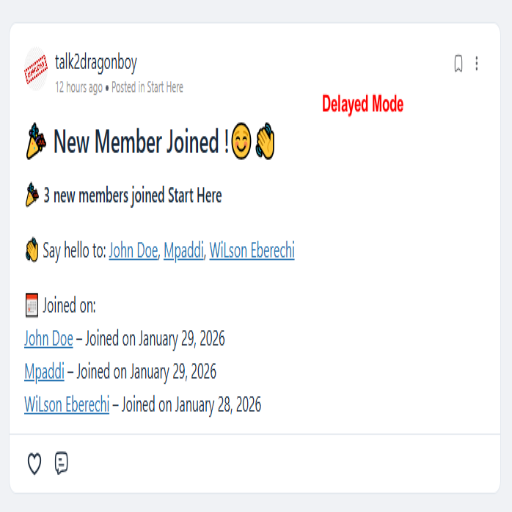
👋 FC Auto Space Join & Welcome Post. The plugin automatically enrolls newly registered users into a selected FluentCommunity space after their first login (email verification) and optionally publishes a welcome post inside that space. Can choose between instant welcome posts for real-time engagement or delayed batch welcomes to group new members into a single announcement.
FC Feed Restrictor
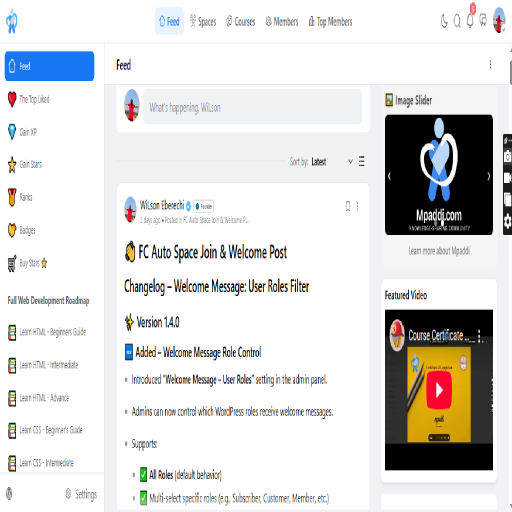
Restrict the FluentCommunity main feed to display posts only from Spaces a user has joined. Improve privacy, content relevance, and community structure.
FC Fluent Anonymous FeedBox Pro
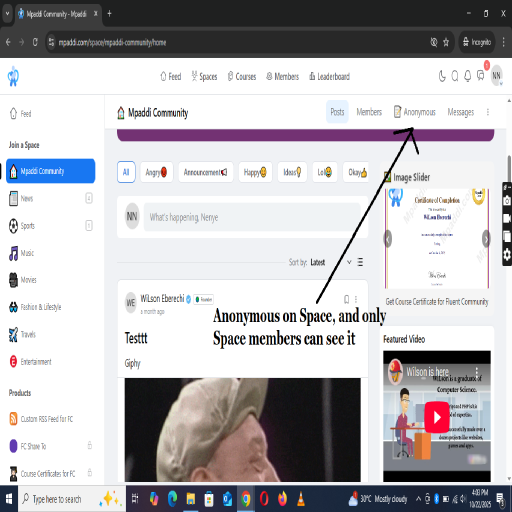
Members can safely post anonymous messages, stories, or confessions inside any space — while admins maintain full moderation control through a pending review system. The plugin creates a seamless “📝 Anonymous” button on community spaces, a friendly front-end submission form, and a simple WordPress dashboard interface for managing pending feeds, approving, or deleting them.

FC RSS Feed
FluentCommunity runs on its own portal, which means its posts don’t appear in the standard WordPress RSS feed. This plugin solves that by generating a dedicated RSS feed for FluentCommunity posts, making it easy to: Share forum updates automatically to social media (e.g., Facebook, Twitter, LinkedIn). Allow subscribers to stay updated with new community posts. Integrate with automation tools like IFTTT, Zapier, or FlowMattic.
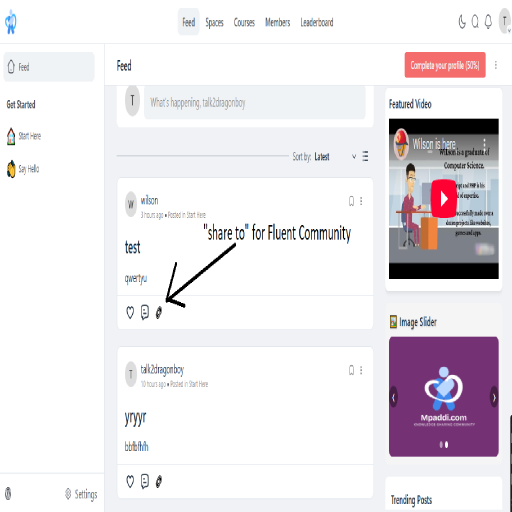
FC Share To
Boost engagement in your FluentCommunity portal with FC Share To, a simple yet powerful plugin that adds social sharing buttons to posts, courses, and lessons. Make it effortless for your community members to share content, drive traffic, and grow your online presence.