Course Certificates
Course Certificates is a premium WordPress plugin that automatically generates beautiful, personalized PDF certificates when a student completes a course. Built specifically for the Fluent Community platform, it helps course creators, educators, and membership site owners celebrate student achievements instantly — no manual work required.

🏆 Course Certificates — Automated PDF Certificates for Fluent Community v4.2
📖 Description
Course Certificates is a premium WordPress plugin that automatically generates beautiful, personalized PDF certificates when a student completes a course.
Built specifically for the Fluent Community platform, it helps course creators, educators, and membership site owners celebrate student achievements instantly — no manual work required.
Customize every detail — your logo, signature, background, watermark, and certificate text — and the plugin will handle the rest. Certificates are automatically created, saved, and emailed to the learner in a polished HTML email with a download link.
Now with enhanced features: track completions in the admin dashboard, display a profile course button, preview certificates in a modal, and embed recent completions anywhere on your site using a shortcode.
Includes REST API integration, and a simple admin dashboard to manage certificate appearance, delivery, and display settings.
✨ Key Features
🎨 Fully Customizable Certificates
- Upload your logo, signature, and background image.
- Add an optional watermark or text overlay (e.g., your brand name).
- Customize certificate text with dynamic placeholders:
{name}— Student name{course_title}— Course name{date}— Completion date
📰 Automatic PDF Generation
- Generates professional PDF certificates instantly on course completion.
- Uses the powerful TCPDF engine for sharp, reliable document rendering.
- Automatically stores generated certificates for each user.
✨ New Features
- Certificate Background Image
- Added support for optional background images on certificates.
- Background images are centered and rendered behind all certificate elements.
- Optimized for A4 landscape layout.
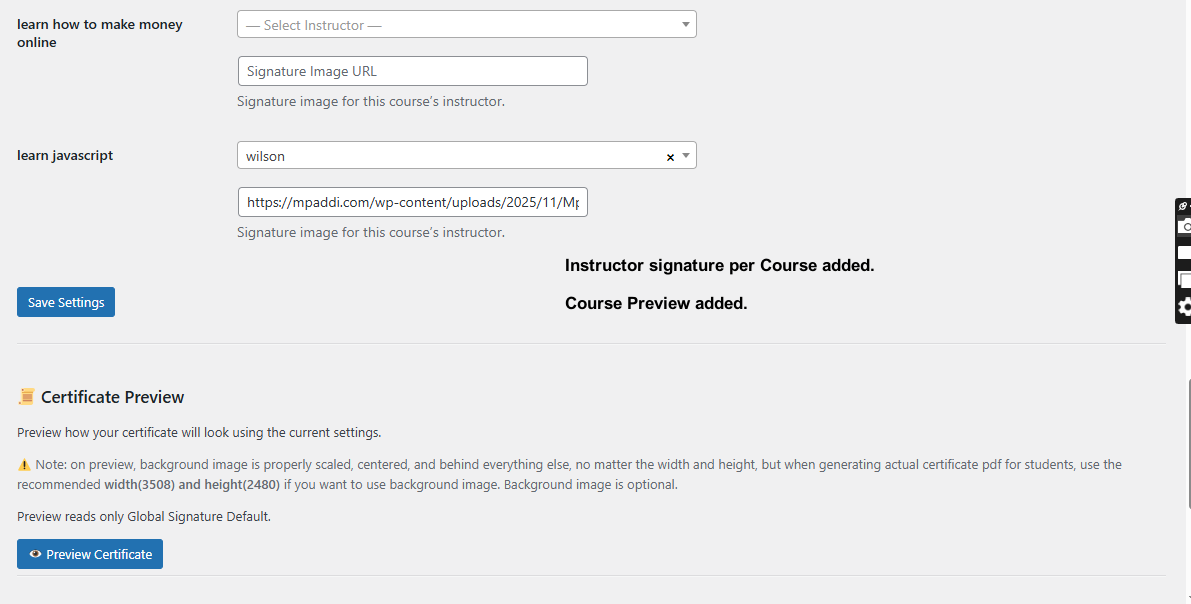
- Per-Course Instructor & Signature
- Introduced course-specific instructor and signature assignment.
- Added a collapsible 👨🏫 Course Instructor & Signature section to keep settings pages clean.
- Course-specific signatures override the global signature when set.
- Instructor Live Search
- Added AJAX-powered searchable instructor dropdown.
- Supports searching by display name, username, or email.
- Optimized for large WordPress user databases.
- Certificate Live Preview
- Added instant certificate preview from the admin panel.
- Preview displays logo, seal, watermark, background image, and global signature.
- Uses sample student and course data for safe testing.
- Enhanced Manual Certificate Generation
- Improved validation for manual certificate creation.
- Prevents duplicate certificates for the same student and course.
- All manually generated certificates are logged under Completed Courses.
Email Delivery
- Automatically sends certificates to learners via email.
- Beautiful, fully-editable HTML email templates.
- Customize subject lines, body text, and call-to-action buttons.
Admin Dashboard
- Completed Courses Page: View all students who have completed courses, including student name, course, and completion date.
- Certificate Preview Modal: Preview certificates live in a sleek modal popup.
- Profile Course Button: Optionally display a “Course” button on user profiles linking to the certificate preview.
- Shortcode Support: Embed recent course completions anywhere using
certificate_completionswithlimitandanimationoptions.
REST API Support
- Developer-friendly endpoint for retrieving certificate data:
GET /wp-json/certificates/v1/get?user_id={USER_ID}&course_id={COURSE_ID}
- Returns JSON response with certificate URL, user info, and status.
Benefits
Save Time
- Automate certificate creation and delivery, eliminating manual work.
Boost Student Motivation
- Reward learners instantly upon course completion, increasing engagement and satisfaction.
Enhance Your Brand
- Deliver professional certificates with your logo, watermark, and branding.
Developer Friendly
- Expose certificate data via REST API for dashboards, integrations, or custom automations.
Track & Showcase Achievements
- Admin dashboard lists completed courses for easy monitoring.
- Profile button allows students to view their certificates quickly.
- Shortcodes let you display recent completions on any page, post, or widget.
Live Preview & Customization
- Test and preview certificate designs in a modal before sending.
- Customize titles, subtitles, and shortcode content for flexible display.
Course Certificates makes it effortless to celebrate your learners’ success.
Whenever a student completes a course, this plugin automatically generates a PDF certificate personalized with their name, course title, and completion date — all styled with your custom branding.
Now with enhanced features: track completions in the admin dashboard, display a profile course button, preview certificates in a modal, and embed recent completions anywhere on your site using a shortcode.
Built for the Fluent Community environment and fully compatible with WordPress, it helps educators and online communities reward achievements instantly and professionally.
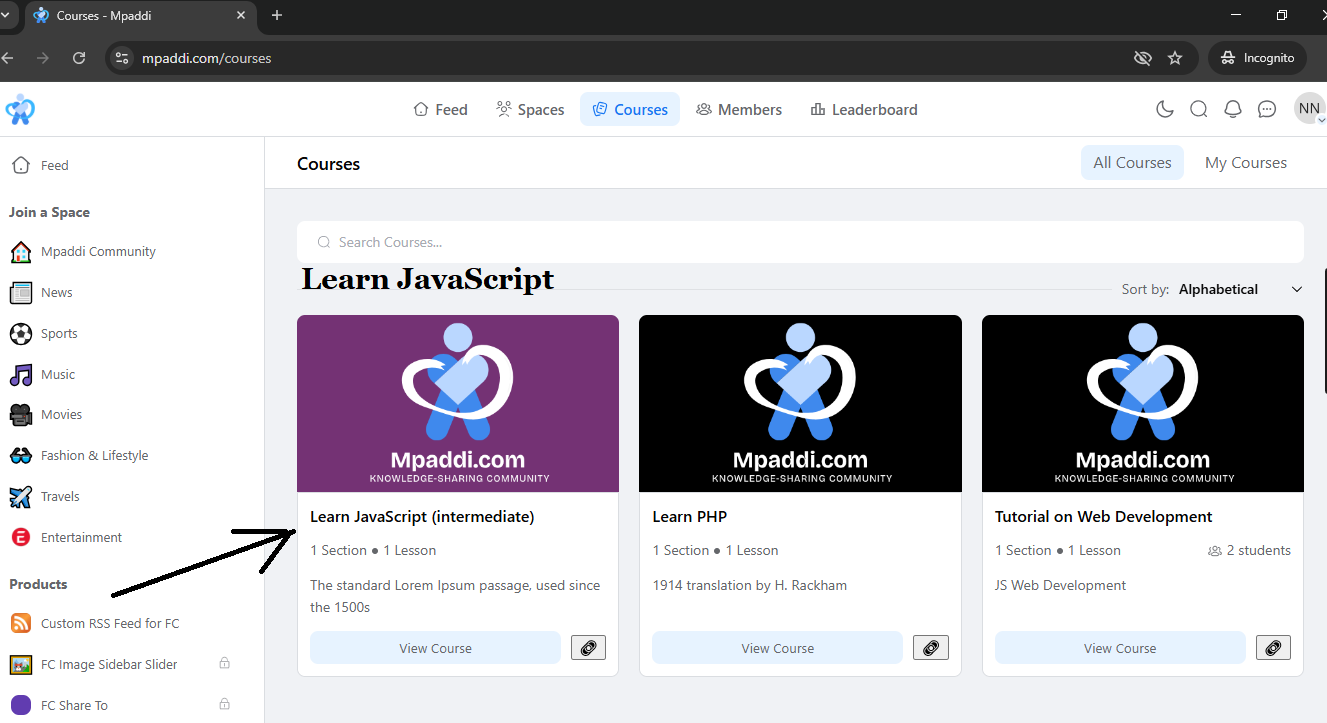
Student Course Enroll
When student has completed a course
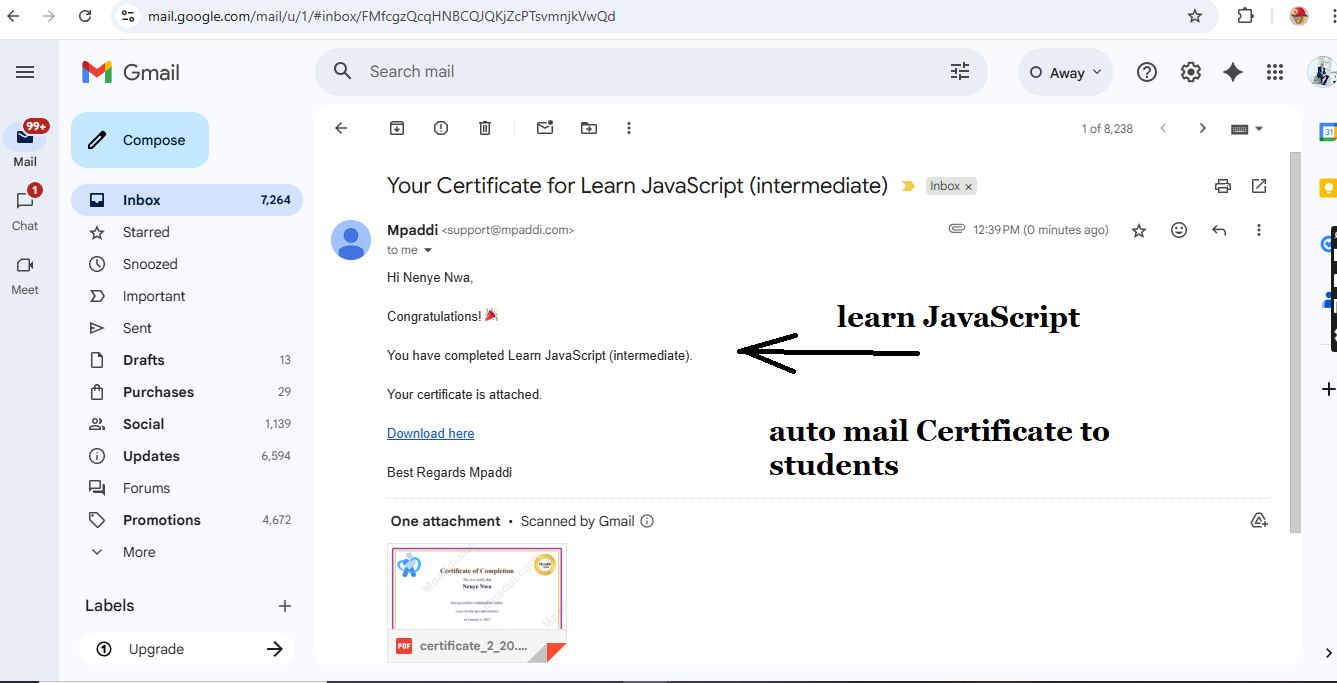
Auto Mail Certificate
Student receives their certificate automatically via mail when course is completed
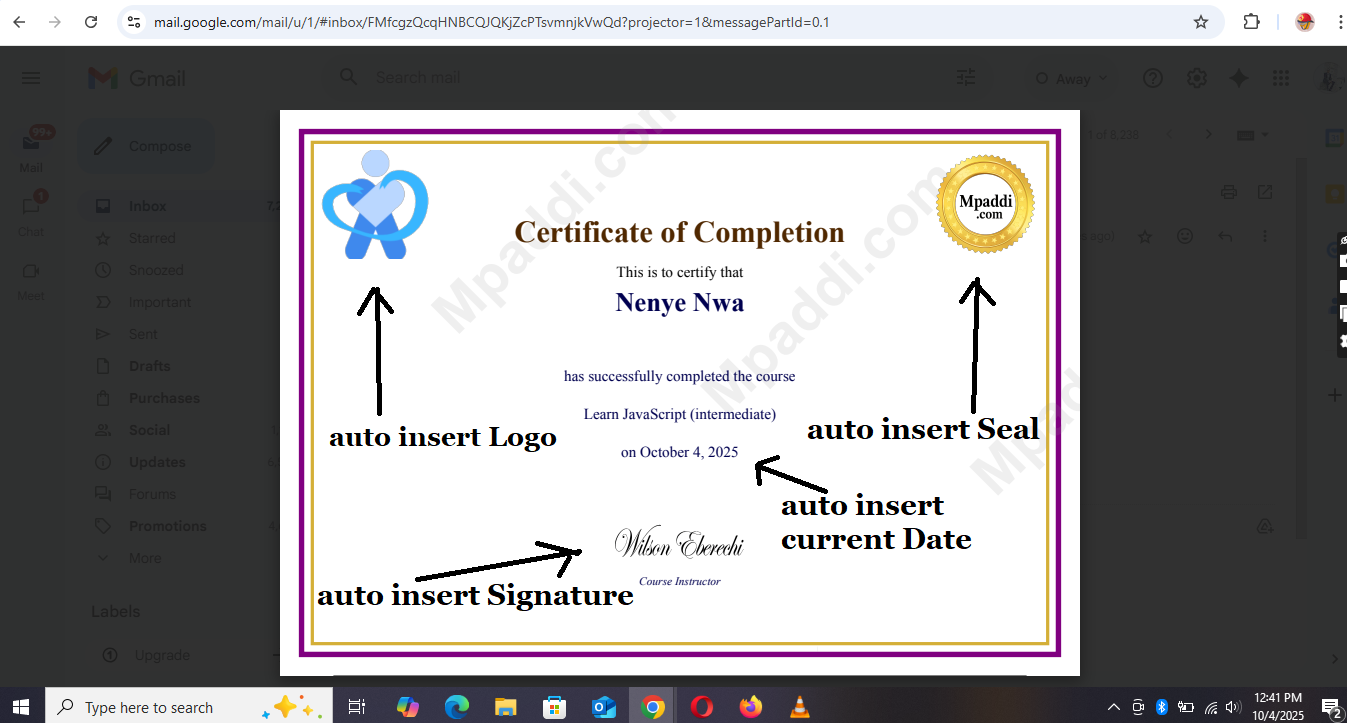
Sample Certificate
How Certificate looks. its auto generated
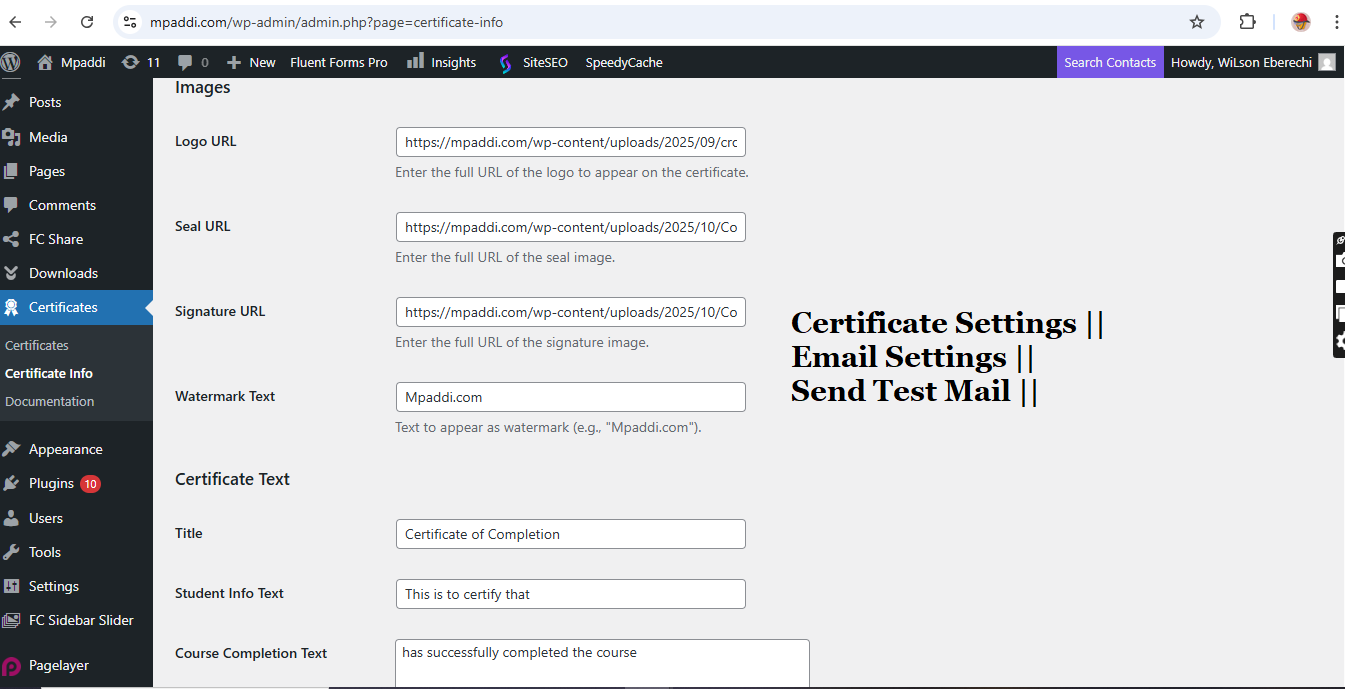
Full Admin Settings
Admins has full control
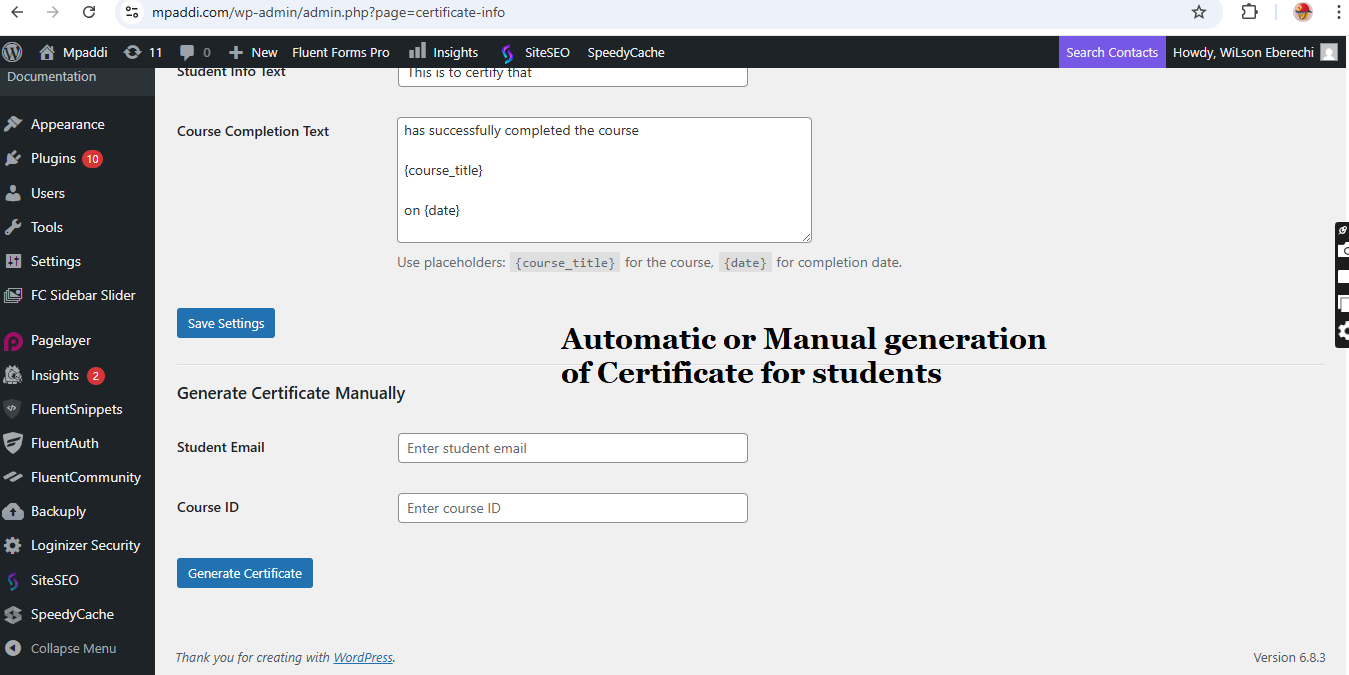
Manual Generation
Not only auto, admin can manually generate Certificate for students and its sent to their email
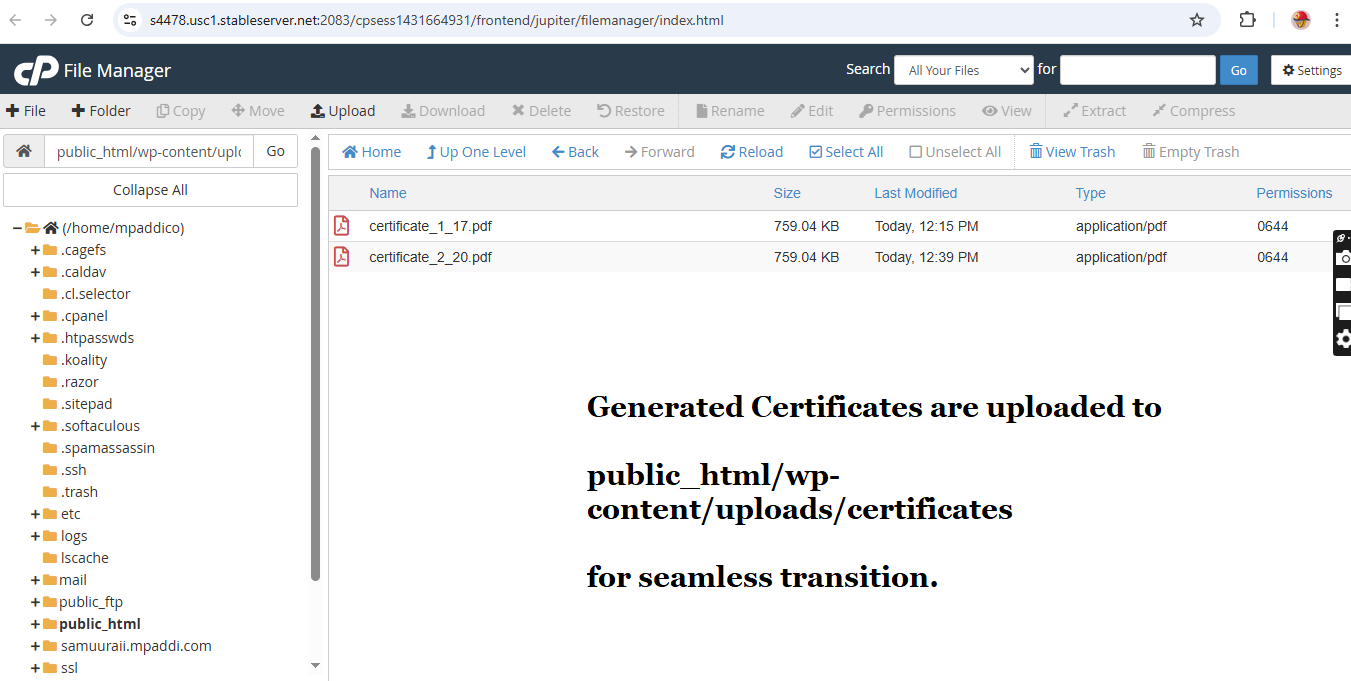
Location of Generated Certs
For seamless transition, Certificates are uploaded to wp contents.
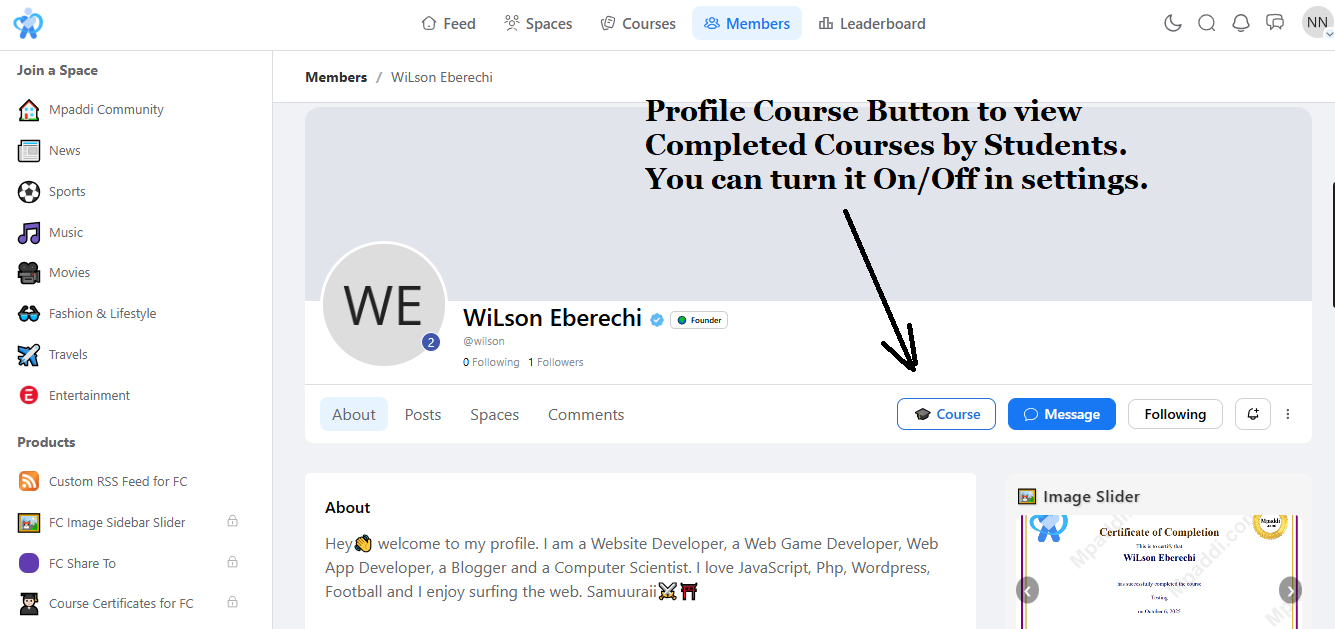
Profile Course Button
Optionally display a 🎓 “Course” button on user profiles linking to the certificate preview.
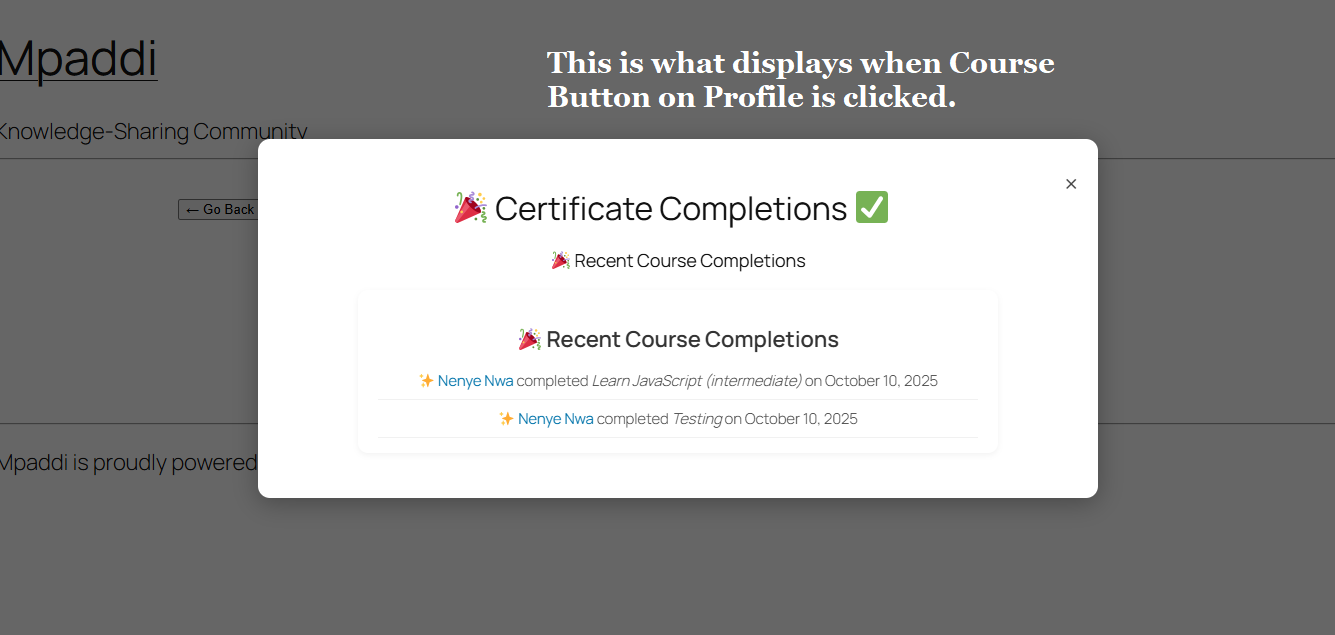
Certificate Preview when Course Button is clicked
Preview certificates live
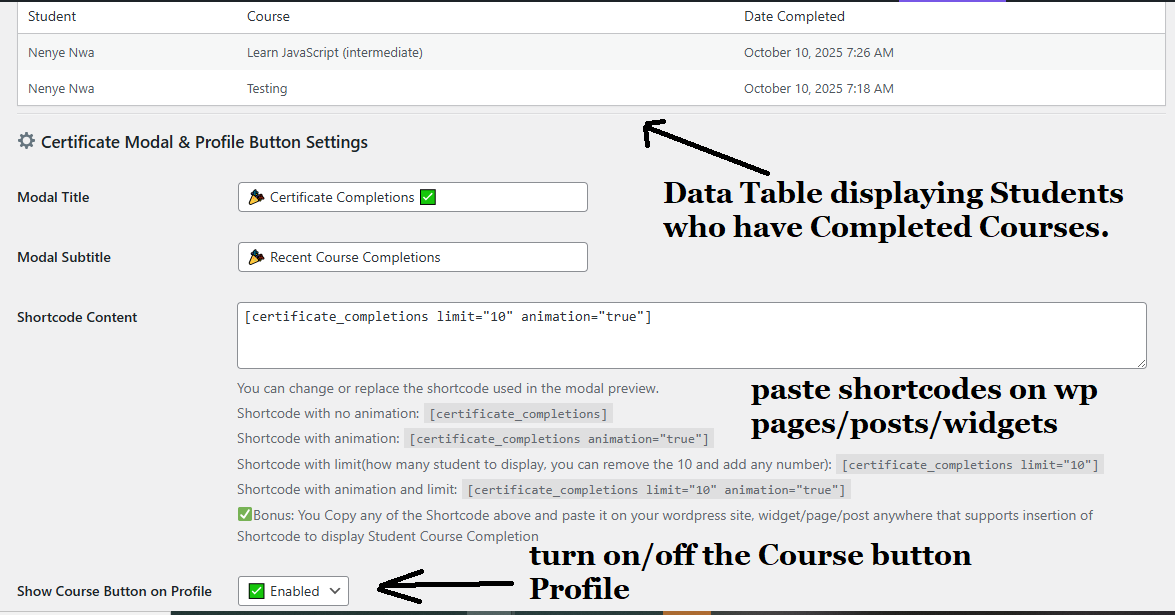
Completed Courses & Shortcode Support
View all students who have completed courses table, Shortcode Embed recent course completions anywhere
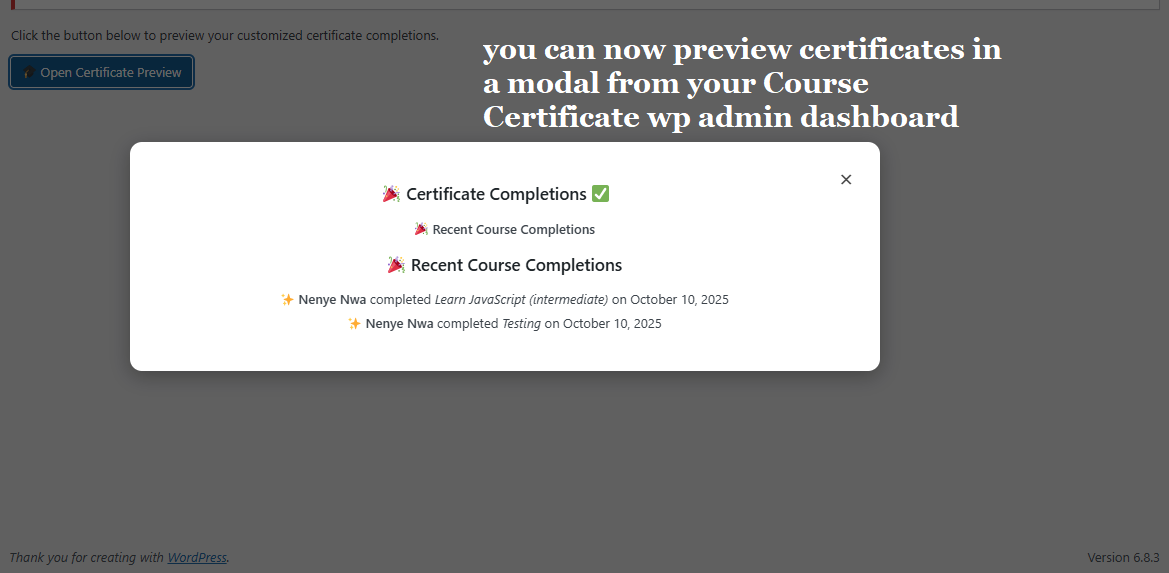
Certificate Preview Modal
Preview certificates live in a sleek modal popup in your admin.
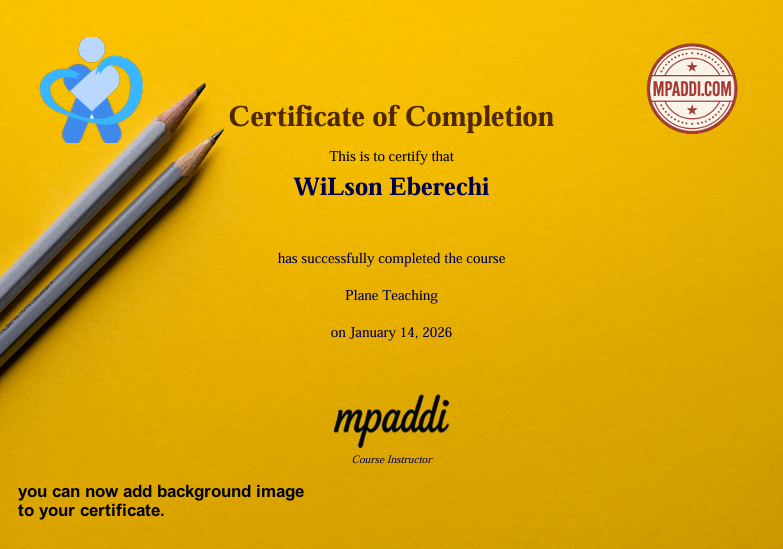
Background Image
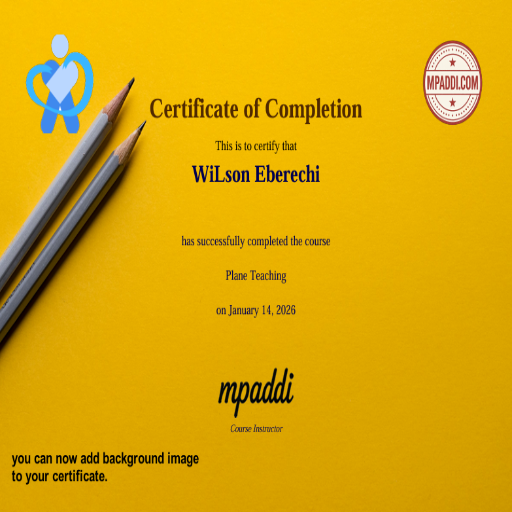
You can now add background image to certificate
Instructor Per Course
Add instructor's signature per course.
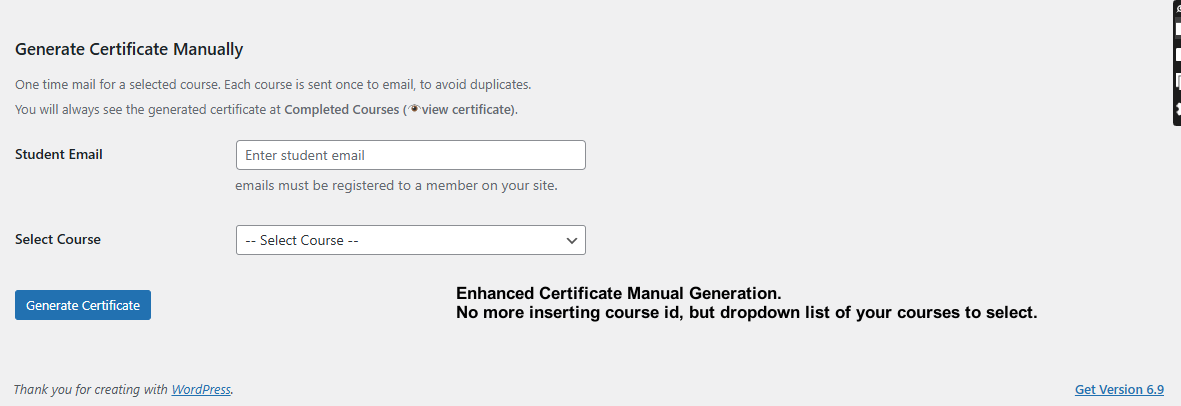
Enhanced Manual Generator
No more inserting course id, but dropdown list of all courses.
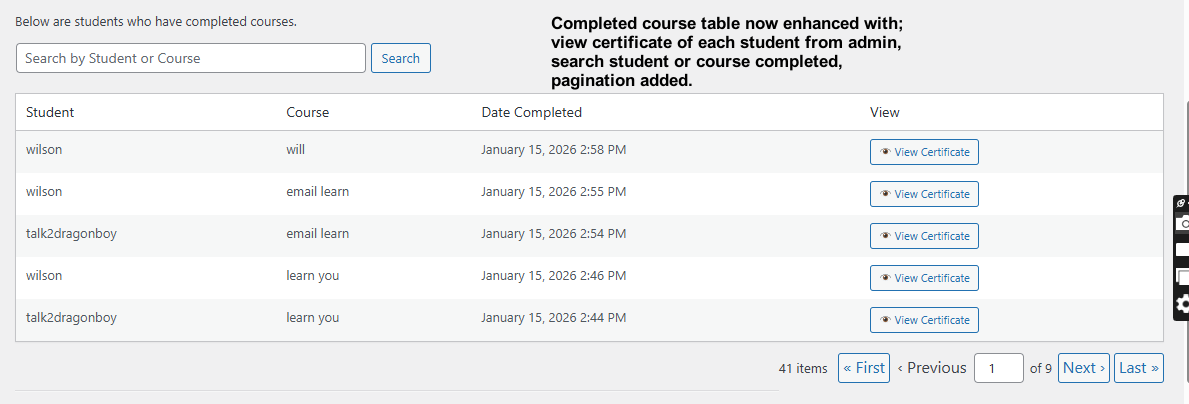
Enhanced Course Completed Table.
view certificate of each student from admin, search and pagination added.
Video Explanation below.
📝 How to Use the Demo
Follow the steps below to experience the complete certificate process:
1. Create a Demo Account
🚀 Ready to Get Started?
Click below to create a demo account and start testing:
👉 Create Demo Account (Fluent Community)
👉 Create Demo Account (WP Admin)
If you already have an account:
👉 Login Here (Fluent Community)
👉 Login Here (WP Admin)
Please use the same Email and Password for both Fluent Community and WP Admin
You will instantly gain access as a Demo Member.
2. Access the Sample Course
Once logged in, open the sample demo course:
3. Complete the Course Steps
Go through the demo course content:
- Read the lessons
- Mark them as completed
This simulates a real learning experience.
4. Generate Your Certificate
At the end of the course, you’ll get an email automatically after completing a course.
Click it to download your certificate.
Your certificate includes:
- Your full name
- Course title
- Issue date
5. Receive Your One-Time Download Email
After generating the certificate:
📩 You will receive an email containing:
- A secure one-time download link
- Your certificate PDF file
Basic
1 Domain
I year including updates
I year customer supports
Premium
5 Domains
1 year including updates
I year customer supports
Gold
15 Domains
5 years including updates
5 years customer supports
Life Time Deal
No limit for Domains
Lifetime Plugin Update
Lifetime Priority Support
All Features Included
🕓 Changelog — Course Certificates for Fluent Community
🚀 Version 5.0
Release Date: April 2026
✨ New Feature: FluentCRM Certificate Trigger Integration
- Added a new FluentCRM automation trigger: “Student Gets Certificate”
- Trigger fires automatically when a student earns a course certificate
- Integrated under Course Certificates category in FluentCRM funnels
✨ New Features: Admin Email Notification System
- Added Admin Email Notification System
- Automatically sends email to admin when a student receives a certificate
- Includes:
- Student name
- Student email
- Course title
- Completion date
- Certificate download link
- Certificate PDF is attached to the email
- Introduced Admin Email Toggle
- Enable/disable admin notifications from Email Settings page
- Uses configured From Email for admin notifications
✨ New Features: 🔍 AJAX Live Search (SPA Experience)
- 🔍 AJAX Live Search (SPA Experience)
- Added real-time search for students and courses
- Instant results without page reload
- Debounced input for better performance
- Integrated seamlessly inside modal and shortcode output
✨ New Features: Overview Dashboard
- Added Overview Dashboard as the first admin submenu page.
- Introduced Top 10 Courses Analytics based on generated certificates.
- Integrated Line Chart visualization for certificate trends per course.
- Added Pie Chart visualization for course distribution insights.
📊 Improvements
- Improved data reporting system
- Optimized database queries for top courses and time-based analytics
- Enhanced admin UI with modern card-style layout (white background, shadow, rounded edges)
🧠 Enhancements
- Better data visualization for course performance tracking
- Clear insights into certificate generation trends
- Improved admin experience with clean and structured dashboard layout
v4.2 — February 2026
✨ New Features
- Automatically generates
course.phppublic page on plugin activation. - Automatically removes generated
course.phpfile on plugin deactivation. - Added security file marker to prevent accidental deletion of non-plugin files.
- Added new translatable strings across public page and modal interface.
- Improved internationalization (i18n) support for better multilingual compatibility.
🌍 Translation Improvements
- Added missing
__()andesc_html__()wrappers for new UI strings. - Updated text domain consistency:
course-certificates. - Synced new strings for compatibility with Loco Translate.
- Improved support for
.pot,.po, and.mogeneration. - Ensured all frontend modal labels and buttons are fully translatable.
🛡️ Security Enhancements
- Added verification check before deleting
course.phpto ensure it was generated by the plugin. - Prevents unintended removal of manually created root files.
- Improved file lifecycle management for safer production usage.
🔧 Improvements
- Refactored activation hook for cleaner execution.
- Optimized plugin lifecycle handling.
- Improved public page generation reliability.
- Minor internal code cleanup and stability improvements.
v4.0 — January 2026
✨ New Features
- Certificate Background Image
- Added support for optional background images on certificates.
- Background images are centered and rendered behind all certificate elements.
- Optimized for A4 landscape layout.
- Per-Course Instructor & Signature
- Introduced course-specific instructor and signature assignment.
- Added a collapsible 👨🏫 Course Instructor & Signature section to keep settings pages clean.
- Course-specific signatures override the global signature when set.
- Instructor Live Search
- Added AJAX-powered searchable instructor dropdown.
- Supports searching by display name, username, or email.
- Optimized for large WordPress user databases.
- Certificate Live Preview
- Added instant certificate preview from the admin panel.
- Preview displays logo, seal, watermark, background image, and global signature.
- Uses sample student and course data for safe testing.
- Enhanced Manual Certificate Generation
- Improved validation for manual certificate creation.
- Prevents duplicate certificates for the same student and course.
- All manually generated certificates are logged under Completed Courses.
🎓 Course Completion & Certificate Management
- Completed Courses Admin Table
- Added a centralized admin table to track completed courses.
- Displays student name, course title, and completion date.
- Shows certificate generation status with direct view access.
- Search & Pagination
- Added search functionality for completed courses by student or course name.
- Implemented pagination for better performance and usability on large datasets.
- Certificate Storage & Viewing
- Certificates are automatically stored as PDFs in
/wp-content/uploads/certificates/. - Each certificate is uniquely generated per student and course.
- Admins can open certificates directly in a new browser tab.
- Certificates are automatically stored as PDFs in
🧩 Frontend & User Features
- 🎓 Course Button on User Profiles
- Added a Course button to user profile action menus.
- Links users directly to course or certificate-related pages.
- Enabled by default with admin control.
- Certificate Completion Shortcode
- Added
- ✨ Derecho Mx completed How to Install WordPress in localhost web server on April 2, 2026
- ✨ Ludovic Schmidt completed Learn HTML - Beginners Guide on March 24, 2026
- ✨ Tom Palmer completed Learn CSS - Beginner's Guide on November 20, 2025
- ✨ John completed Learn CSS - Beginner's Guide on November 11, 2025
- ✨ Nenye Nwa completed Learn CSS - Beginner's Guide on November 10, 2025
- ✨ Nenye Nwa completed Learn JavaScript (intermediate) on October 10, 2025
- ✨ Nenye Nwa completed Testing on October 10, 2025
- Supports configurable limits and optional animations.
- Works across posts, pages, widgets, and shortcode-enabled areas.
- Added
- Certificate Completion Preview Modal
- Added an admin preview modal for completion displays.
- Allows visual verification of shortcode output, layout, and animations before publishing.
⚙️ Automation & Reliability
- Automatic Course Completion Tracking
- Course completions are logged instantly upon completion.
- Records are stored independently of certificate generation.
- Ensures accurate historical tracking even if certificates are generated later.
v3.5 — October 2025
🚀 Major Feature Update: Course Display & Completion Tracking
New Features
- 🧾 Completed Courses Admin Page
- Added a new admin submenu under Certificates → Completed Courses.
- Displays student name, course title, and completion date.
- Supports pagination and sorting for large datasets.
- 🧍♂️ Profile Course Button
- New toggle option to display a 🎓 Course button on user profiles.
- Links directly to the user’s certificate preview page.
- 🪄 Certificate Preview Modal
- Added a front-end modal for live previewing certificates.
- Includes smooth animations, close button, and dynamic data rendering.
- 🔖 Shortcode Enhancements
- Introduced
- ✨ Derecho Mx completed How to Install WordPress in localhost web server on April 2, 2026
- ✨ Ludovic Schmidt completed Learn HTML - Beginners Guide on March 24, 2026
- ✨ Tom Palmer completed Learn CSS - Beginner's Guide on November 20, 2025
- ✨ John completed Learn CSS - Beginner's Guide on November 11, 2025
- ✨ Nenye Nwa completed Learn CSS - Beginner's Guide on November 10, 2025
- ✨ Nenye Nwa completed Learn JavaScript (intermediate) on October 10, 2025
- ✨ Nenye Nwa completed Testing on October 10, 2025
- Added parameters:
limit— control how many completions are shown (default: 10).animation— enable/disable animation effects (true/false).
- Example:
- ✨ Derecho Mx completed How to Install WordPress in localhost web server on April 2, 2026
- ✨ Ludovic Schmidt completed Learn HTML - Beginners Guide on March 24, 2026
- ✨ Tom Palmer completed Learn CSS - Beginner's Guide on November 20, 2025
- ✨ John completed Learn CSS - Beginner's Guide on November 11, 2025
- ✨ Nenye Nwa completed Learn CSS - Beginner's Guide on November 10, 2025
- ✨ Nenye Nwa completed Learn JavaScript (intermediate) on October 10, 2025
- ✨ Nenye Nwa completed Testing on October 10, 2025
- Introduced
Improvements
- 🧩 Optimized admin menu structure to group all certificate-related pages.
- ⚙️ Improved database logging for course completion tracking.
- 💬 Enhanced shortcode rendering for better performance and responsive layout.
Fixes
- 🧯 Fixed duplicate menu item issue in the WordPress admin sidebar.
- 🧹 Cleaned up deprecated hooks and improved compatibility with WordPress 6.6+.
- 🔒 Improved license verification flow for better stability with Mpaddi License Generator.
v2.5 — September 2025
🎨 Certificate Customization & License Integration
- Added full customization options for certificate logo, signature, watermark, and text.
- Integrated license verification using
Mpaddi License Generator. - Introduced admin notices for invalid or expired licenses.
- Improved PDF generation reliability and font rendering with TCPDF.
v2.0 — June 2025
🧱 Plugin Core & Automation
- Initial stable release of Course Certificates.
- Added automated PDF certificate generation on course completion.
- Implemented email delivery system with HTML templates.
- Added REST API endpoint for retrieving certificate data.
- Introduced admin dashboard for global settings and customization.
v1.0 — March 2025
🔰 Beta Release
- Initial beta for internal testing.
- Basic PDF generation and storage.
- Manual admin certificate creation.
Related Products
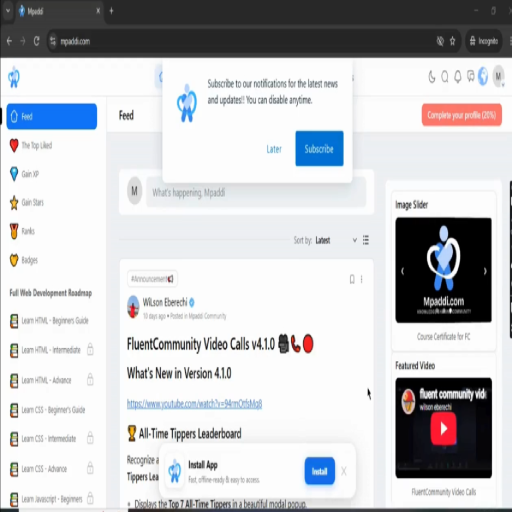
Community Sidebar for FluentCommunity
Community Sidebar transforms the FluentCommunity sidebar into a dynamic, interactive community hub with member discovery, space recommendations, online member activity, trending topics, daily inspiration, promotional banners, and featured video content—all managed from one clean WordPress admin area. Community Owners can earn money by promoting people, paid banners on image slider, featured videos, paid spaces.
FC Auto Space Join
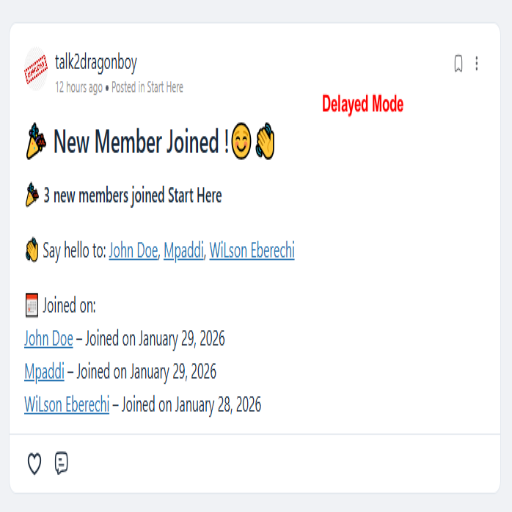
👋 FC Auto Space Join & Welcome Post. The plugin automatically enrolls newly registered users into a selected FluentCommunity space after their first login (email verification) and optionally publishes a welcome post inside that space. Can choose between instant welcome posts for real-time engagement or delayed batch welcomes to group new members into a single announcement.
FC Feed Restrictor
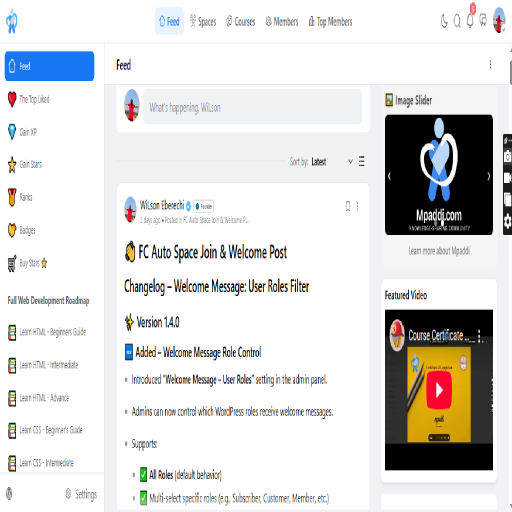
Restrict the FluentCommunity main feed to display posts only from Spaces a user has joined. Improve privacy, content relevance, and community structure.
FC Fluent Anonymous FeedBox Pro
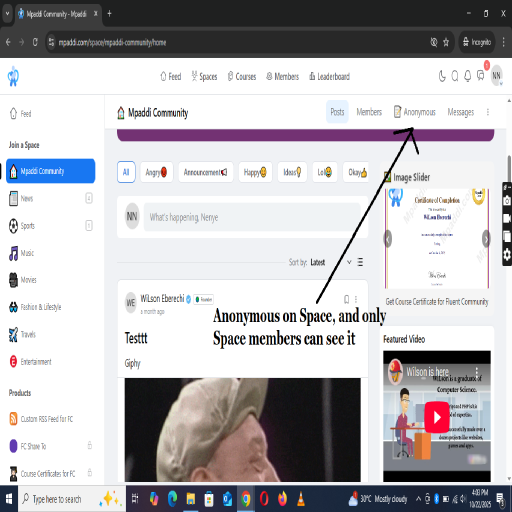
Members can safely post anonymous messages, stories, or confessions inside any space — while admins maintain full moderation control through a pending review system. The plugin creates a seamless “📝 Anonymous” button on community spaces, a friendly front-end submission form, and a simple WordPress dashboard interface for managing pending feeds, approving, or deleting them.

FC RSS Feed
FluentCommunity runs on its own portal, which means its posts don’t appear in the standard WordPress RSS feed. This plugin solves that by generating a dedicated RSS feed for FluentCommunity posts, making it easy to: Share forum updates automatically to social media (e.g., Facebook, Twitter, LinkedIn). Allow subscribers to stay updated with new community posts. Integrate with automation tools like IFTTT, Zapier, or FlowMattic.
FC Share To
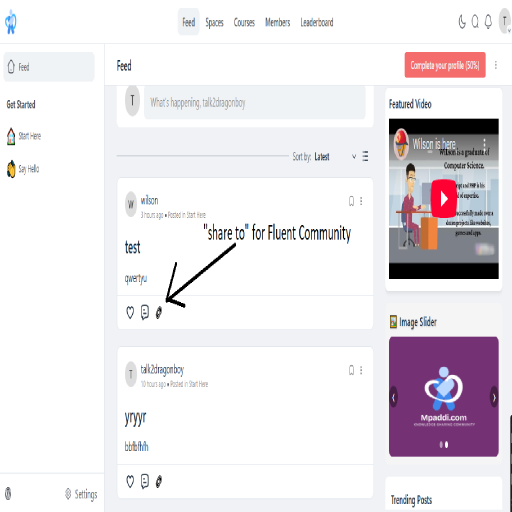
Boost engagement in your FluentCommunity portal with FC Share To, a simple yet powerful plugin that adds social sharing buttons to posts, courses, and lessons. Make it effortless for your community members to share content, drive traffic, and grow your online presence.